Brainstorm)
My project is focused more on my childhood history than family history. The base photo is me with different photos layered on top of each other representing who I was as a child, and who I am. There’s going to be a layer for words because I’ve always been a big writer, especially as a kid, a layer for my love of art, and a layer for an extra element, I’m not sure what. That’s my idea and I’ll see what I can come up with! 🙂
All skills used)
- layers palette & blending options
- locking various layers
- opacity within layers and erasing into layers
- unlocking your background layer
- adjusting the size and opacity of various tools
- using the clone stamp + the spot healing brush for “retouching” or “cloning”
- image size of one file vs. another
- canvas size re: concerning the overall layout and design of your montage
- border or edges of your montage
- achieving a “vignette” look using the selection & feather tools
Final Product)
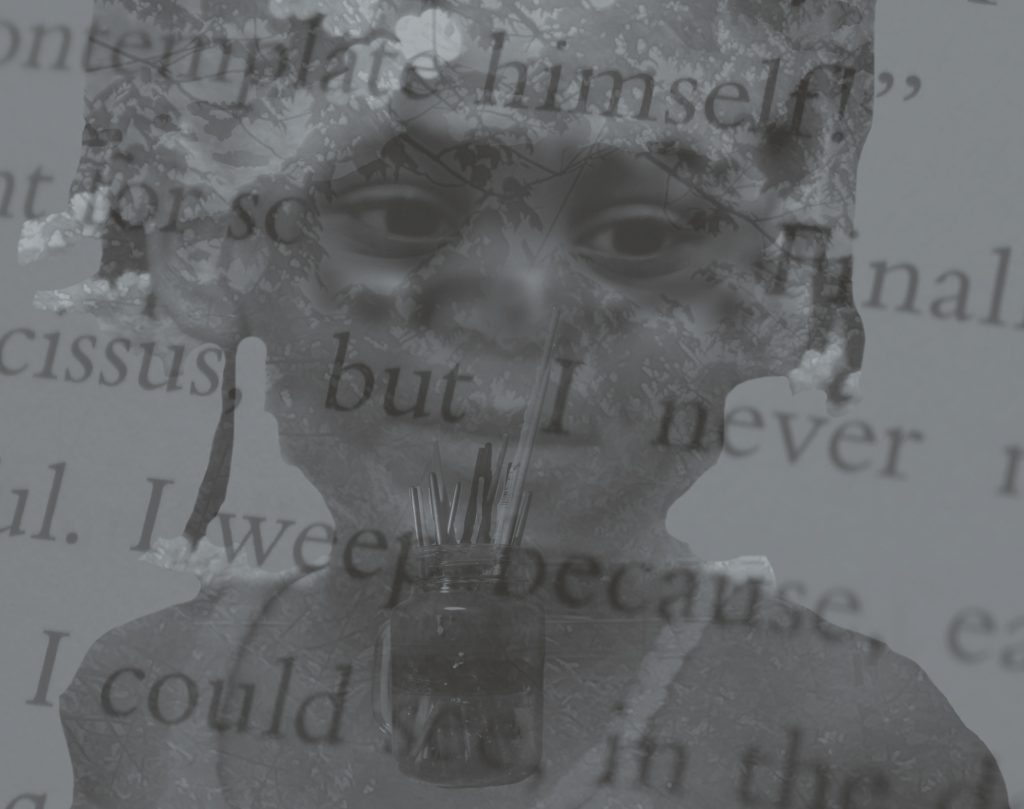
I think this image is FANTASTIC! I just love how you used the text from a book as your text element and I think the resulting image is moody and meaningful. Great job using the Photoshop tools! I really relate to the mood of the image, as an artist myself, and appreciate all of the symbolism of each of the layers… wonderful work, Shanyah. 🙂